
Ameliorate is a web3 game based on the Stellar Network.
All in-game items are actually assets on the Stellar Blockchain.
As such, having a funded Stellar Wallet is required to start truly playing the game.
Ameliorate Game recommends using the Albedo wallet.
Albedo is a wallet which can be used as a chrome-extension or directly from a web browser.
If you are new to the Stellar Network, then Stellar Quest is a great and fun way to learn about Stellar while earning NFTs are rewards!
Complete These Following Stellar Quests to learn how to:
1. Create a Wallet using Albedo:
https://quest.stellar.org/learn/series/0/quest/1
2. Add a Trustline to a new Asset:
https://quest.stellar.org/learn/series/1/quest/3
Congratulations! Not only did you just earn your first Stellar NFTs, but you have taken your first steps into the wonderful world of Blockchain!
To begin the game, you will need to add the Ameliorate Token as a Trustline to your Albedo Wallet.
Adding any asset to your wallet requires you to lock 0.5XLM away. This 0.5xlm is not gone, it is simply locked while you have a trustline with an asset.
New Wallets also need at least 1 XLM to be active.
So make sure to have at least 2 XLM to begin.
Open your Albedo Wallet and make sure you are on the Balance tab (in the lower right corner)
Now Click on Add Trustline

Now you will click manually, so that we can manually provide the asset parameters.

Enter the following information for the asset parameters:
Asset Code: Ameliorate
Asset Issuer: GAI4UZHPC7VSBQ77IMJWVAOPGOJIVCSP2BBI3BX2FBLUPIXVONXIMF5G
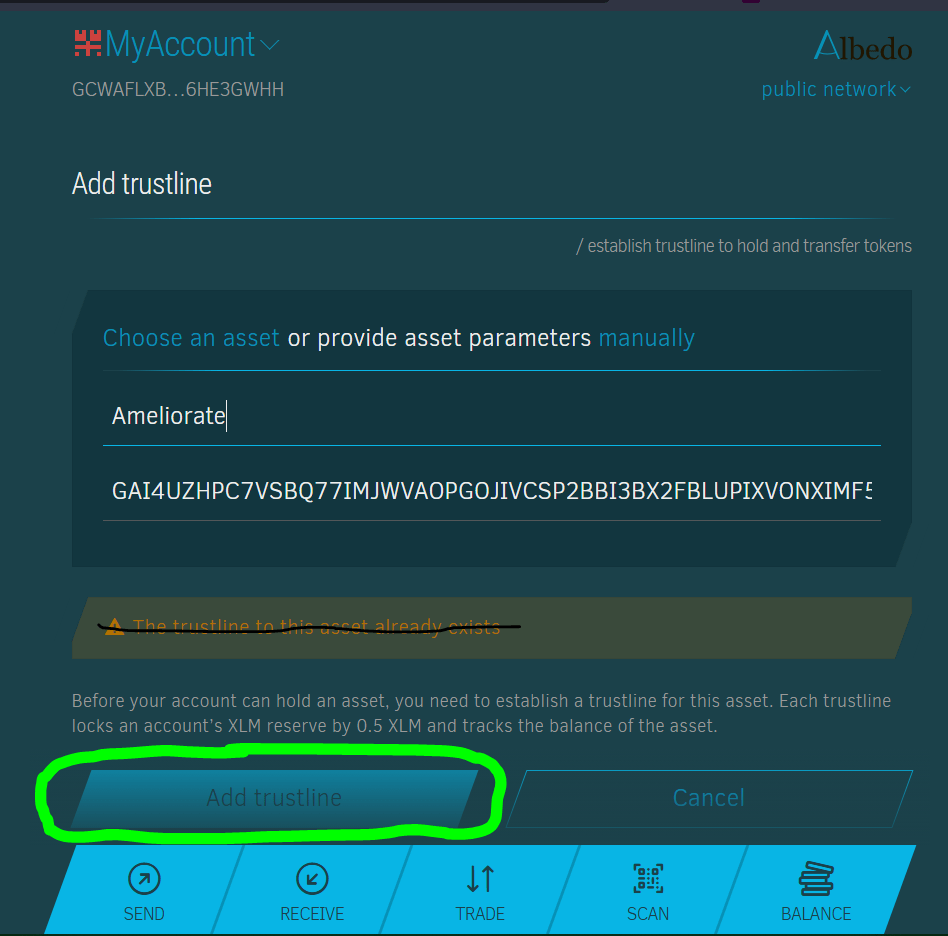
Then click the “Add trustline” button.
You should not see a “The trustline to this asset already exists” message ( as you are adding the trustline for the first time )
And that’s it!
Now you can send/receive Ameliorate Tokens using your Stellar account address!

